
Discord has grown far beyond a place for gaming chats. Today, communities for gaming, education, technology, finance, fitness, creators, and businesses use Discord to share resources, run events, and keep members engaged.
That has also given rise to sharing a huge number of links between discord members. But this can get messy with long URLs that take up space and make it harder to understand what's being clicked. A good link shortener can turn those lengthy addresses into clean, shareable links while giving community members useful information about link performance.
For Discord admins and marketers, the real advantage is going beyond simply making a URL shorter. With the right tool like Bitsy, you can create memorable links, add tracking, and understand how members interact with your shared content.
Why Use Short URLs for Discord?
A Discord URL shortener can make links easier to share across announcements, channels, bot messages, event promotions, and community resources. Short links are also useful when you're sharing the same destination repeatedly but want to distinguish between different campaigns.
For example, a gaming Discord could use one short link for a tournament registration page and another for its game server. An education community might create separate links for course materials and webinar registrations.
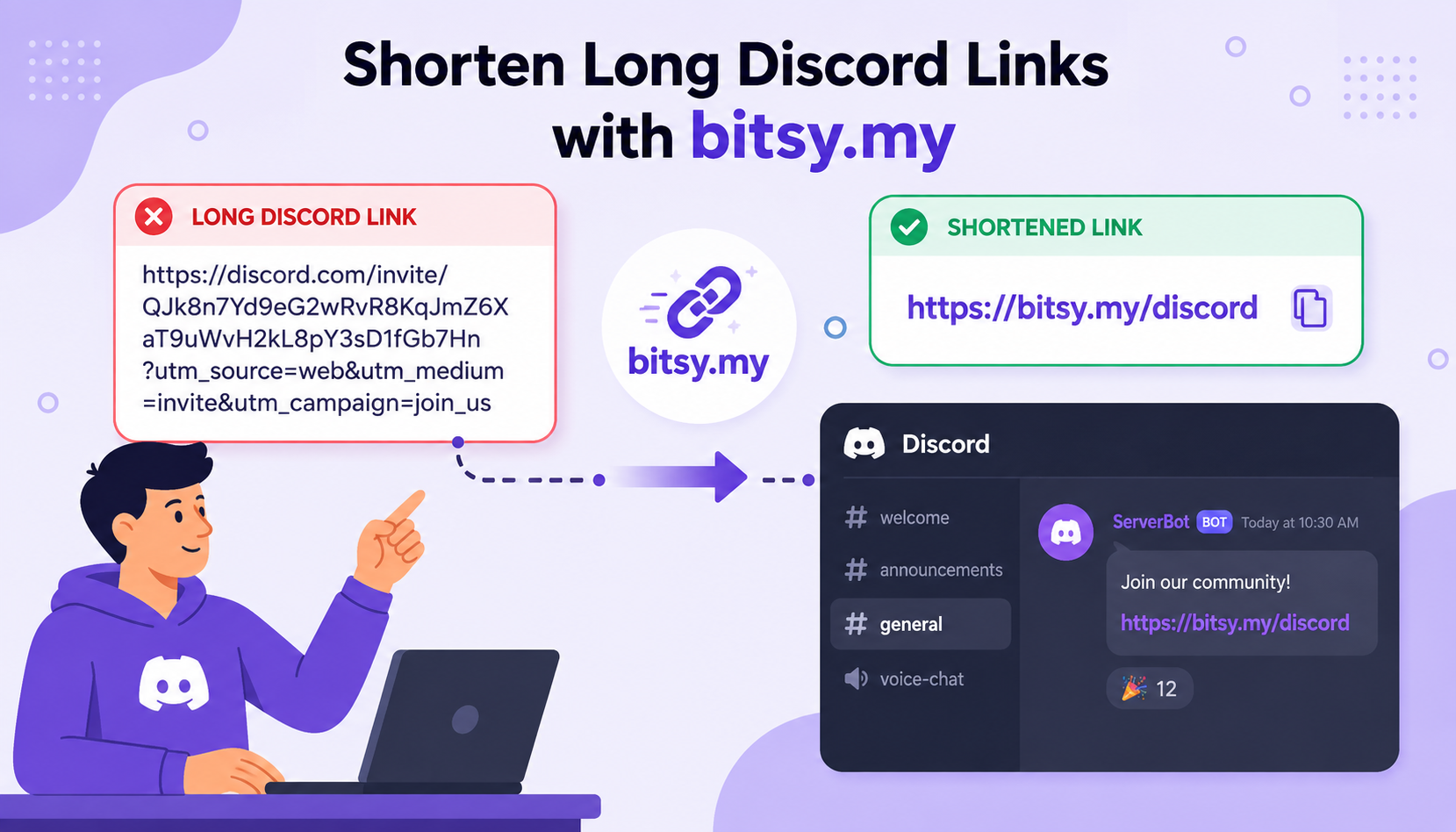
It's like posting a URL like this:
`https://example.com/products/24hr-tournament?utm_source=discord&utm_campaign=community&utm_content=announcement`
It works, but it isn't exactly easy on the eyes.
A short URL is much cleaner:
`https://bitsy.my/24hr-tournament`
The goal isn't to shorten every URL just because you can. It's to make important links easier to recognize, manage, and measure.
How to Create Clean and Clickable Discord Links
Creating a short URL is straightforward. Start with the full destination URL, customize the link if the option is available, and then share the result in your Discord channel.
With a Bitsy URL shortener, you can create custom and branded links, add tags and UTM parameters, and manage your links from one place. Bitsy also provides analytics that can show information such as clicks, devices, locations, referrers, and click trends.
A useful short URL should be:
- Short: Keep unnecessary characters out of the visible link.
- Relevant: Use a recognizable word or campaign name when possible.
- Easy to share: Make it simple enough to copy or remember.
- Trackable: Add analytics when measuring campaign performance matters.
- Consistent: Use a naming convention across your Discord campaigns.
For instance, instead of sharing an obscure shortened URL, a community might use something like `bitsy.my/event` or another available branded/custom format. The exact destination can remain long and complicated behind the scenes.
Gaming communities are a natural fit for short links because they often share several destinations. This can be tournament registrations, game guides, creator channels, server rules, giveaways, or external game servers.
Instead of repeatedly posting a long registration URL, they could create:
`www.bitsy.my/tournament`
The same link can appear in the tournament announcement, while analytics help the organizer understand whether the campaign is generating clicks.
A Discord URL shortener can be especially handy when different links are being shared across multiple channels. With tracking parameters or link tags, organizers can separate campaigns and get a clearer picture of which promotional efforts are working.
Track Discord Clicks and Understand Your Audience
Shortening a URL is useful, but tracking is where things become more interesting.
Analytics can help answer questions such as:
- How many people clicked the link?
- When are members most likely to click?
- Which campaign generated more traffic?
- Which devices are members using?
- Where are clicks coming from?
- Which links are performing best?
Bitsy provides link analytics covering areas such as geo-location, device information, browsers, operating systems, referrers, and click trends.
This information can help Discord admins make smarter decisions. If a particular announcement consistently generates clicks, for example, you can examine what made it successful and apply that insight to future campaigns.
Keep Discord Short Links Clear, Useful, and Trustworthy
Short links should make your community's experience better; not make members suspicious.
Whenever possible, use recognizable custom or branded links. Avoid creating a collection of random-looking URLs that give members no indication of where they might lead.
It's also worth reviewing links periodically. If you're promoting a limited-time event, for example, an expiration feature can help prevent an old campaign link from remaining active indefinitely. Bitsy supports link expiration as well as password protection and other link-management features.
Most importantly, only shorten and share destinations you trust. A short URL hides the longer destination from the reader, so transparency and good community moderation still matter.
Create Trackable Discord Links With Bitsy
For Discord communities, short URLs can solve a surprisingly simple problem: making links easier to share while giving admins more control over what happens after the click.
Whether you're promoting a gaming tournament, an online course, an investing newsletter, or a fitness challenge, clean links can make announcements easier to read and campaigns easier to manage.
A Bitsy URL shortener brings short links, custom links, UTM tools, link management, and analytics together, making it useful for communities that want more than basic URL shortening.
If your Discord server regularly shares external content, start by identifying the links you post most often. Turn those into clear, memorable short URLs, add tracking where it makes sense, and use the resulting data to understand what your community actually engages with.
That small change can make your Discord communication cleaner, and your link strategy much more measurable.